Layout
Any widget that implements Et2LayoutHost ( -
Et2Customfields
-
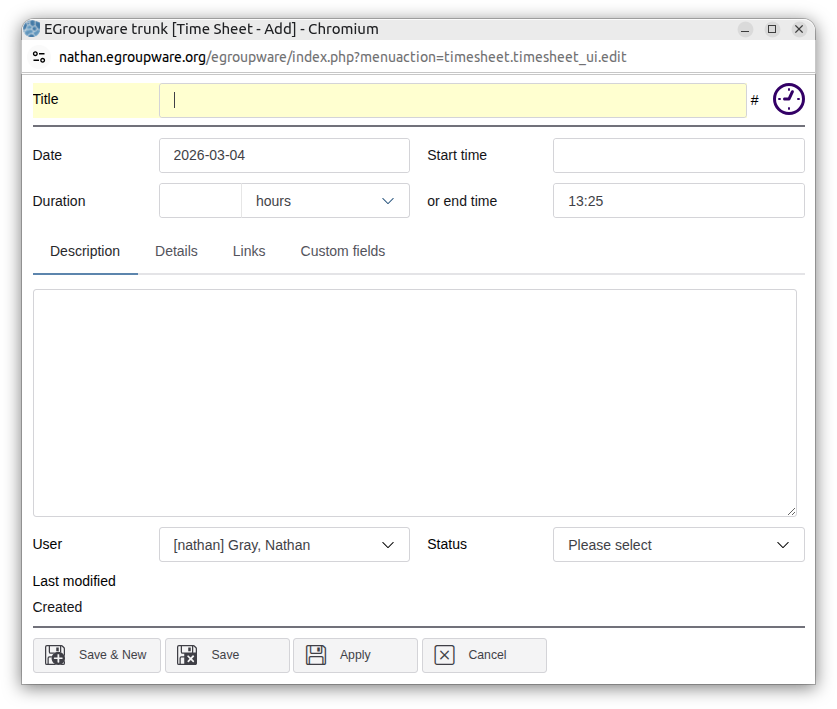
Et2Template) can use thelayoutattribute (stack,2-column,edit,absolute) to control layout behaviour.editis the same as2-columnwith a few tweaks for edit dialogs, notably the header & footer stay full-width.stackis a simple stack (1-column) of widgets.
2-column (wide container)
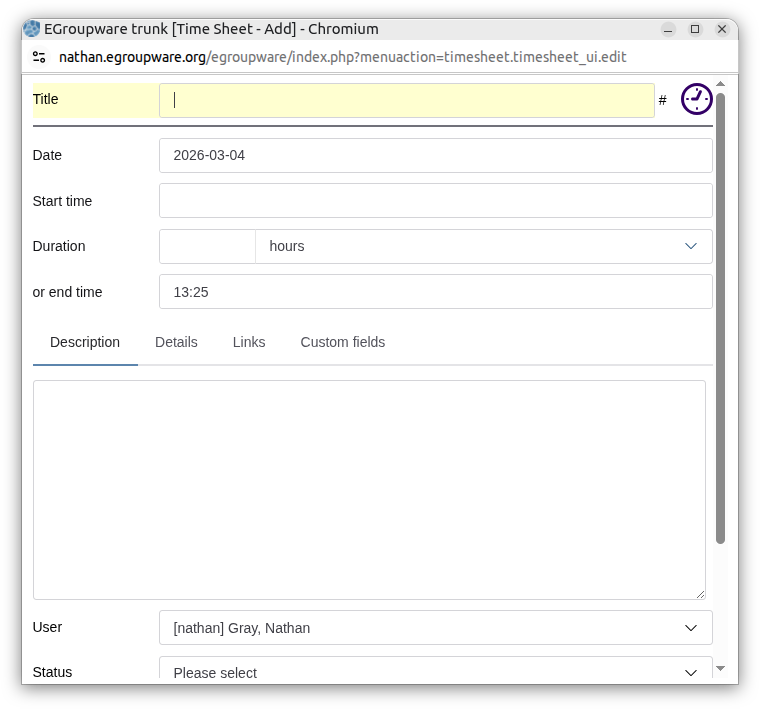
Collapsed to 1 column
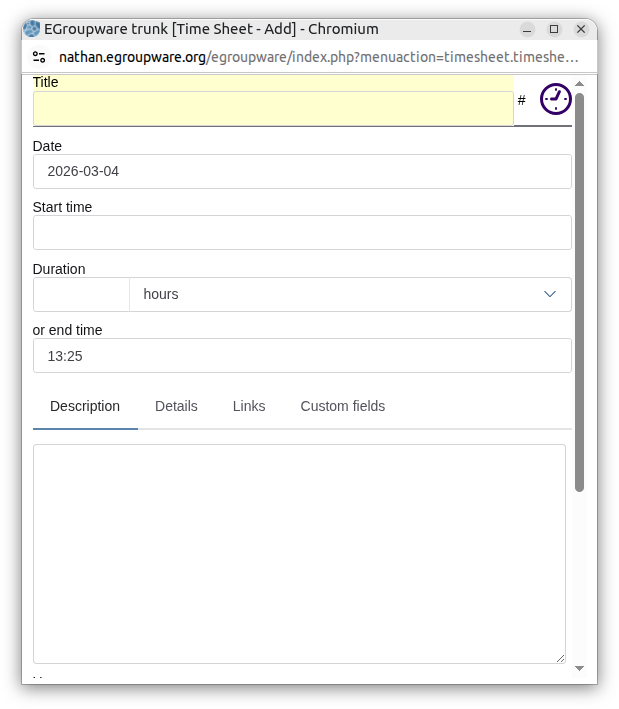
Label wrapping
CSS Variables
--column-min-width
- Default:
26rem -
Used by
2-columnandeditto determine minimum column width before collapsing to 1 column. -
--column-min-widthand--label-widthtogether determine when the label / widget break point is reached.
Example:
et2-template[layout="edit"] {
  --column-min-width: 24rem;
}
--collapse-width
- Default:
600px - Fallback container-query collapse point for narrower or legacy behavior.
Example:
et2-template[layout="2-column"] {
  --collapse-width: 680px;
}
Popups inside a layout
2-column and edit make their host a container query container so the grid can
decide for itself when to collapse. et2-customfields does the same regardless of its layout.
That breaks any hoisted Shoelace popup opened inside them: Floating UI reads a
container-type ancestor as the containing block for the popup’s position: fixed,
no browser does (checked on Chrome 152 and Firefox 142), and the dropdown ends up
scrollTop - containerTop away from its field and clamped to the height of the panel it sits in.
Et2TopLayerPopupController, created alongside Et2LayoutController, moves those
popups into the top layer while they are open, where both agree the coordinates are viewport coordinates.
Nothing has to be done per widget, and the container itself is untouched - giving it real containment (contain: layout) would fix the dropdowns and break everything else that escapes a scrolling panel with
position: fixed, including the rich text editor’s menus.
Grow rows
For stack, 2-column, and edit, row heights are managed by the layout
to distribute extra vertical space.
et2-tabboxgrows automatically-
[grow]supports optional numeric factors (grow="2"etc.) to distribute extra space proportionally.
Widget Implementation
Et2LayoutController applies layout strategies (stack, 2-column,
edit, absolute) to layout hosts and keeps grow rows sized correctly as content
resizes.
Most column behavior is implemented in LESS (kdots/css/src/layouts/*.less), while this
controller and Et2LayoutStrategies.ts handle runtime behavior like grow-row sizing and strategy
lifecycle.
Row sizing is recalculated via ResizeObserver + requestAnimationFrame
Usage
Any widget that wants layout behavior should implement Et2LayoutHost and instantiate the
controller.
import {Et2LayoutController, Et2LayoutHost} from "./Et2LayoutController";
import type {Et2LayoutName} from "./Et2LayoutStrategies";

export class MyLayoutHost extends HTMLElement implements Et2LayoutHost
{
	layout : Et2LayoutName = "2-column";
	private _layoutController = new Et2LayoutController(this);
}
At lifecycle updates, the controller:
- Looks up the strategy from
layout - Cleans up the previous strategy (if changed)
- Applies the active strategy to current children
2-column / edit responsive behavior
2-column and edit share the same grid base mixin in:
kdots/css/src/layouts/grid-base.less
The base grid uses:
grid-template-columns: repeat(auto-fit, minmax(var(--column-min-width, 26rem), 1fr));
This keeps two columns while there is enough room, then collapses to one column before columns become too narrow.
In one-column mode, label/input parts are normalized together so widgets do not wrap inconsistently per-field:
-
::part(form-control-label)->width: 100%,flex-basis: 100%,margin-right: 0 ::part(form-control-input)->flex-basis: 100%::part(form-control-help-text)->left: 0