Template
<et2-template> | Et2Template
Load & populate a template (.xet file) into the DOM
The template displays a loader while it is loading the file, and is replaced with the actual content once all widgets are ready.
<style>
    et2-template {
        min-height: 5em;
    }
</style>
<et2-template template="template"></et2-template>
Loading
Since template files are auto-fetched from the server, actual examples here would not work.
Template
Use template attribute with <app>.<template> format to specify which
template to load.
This will fetch /<app>/templates/<interface>/<template>.xet, where
<interface> is the user’s current interface, or default.
<et2-template template="infolog.edit"></et2-template>
Sub-templates
If the template file contains more than one template definition, you can load any of the other templates defined after the file has been loaded using either their full ID or a shortened form. This is useful for breaking a template into smaller parts.
multiple.xml:
<overlay>
    <template id="multiple.one" class="one">...</template>
    <template id="multiple.two" class="two">...</template>
    <template id="multiple" class="multiple">
        ...
        <et2-template template="multiple.one"></et2-template>
        ...
        <et2-template template="two"></et2-template>
    </template>
</overlay>
URL
If you need to bypass the autoloading based on template ID, you can specify the full URL to the template
file. If there are multiple templates defined in the file and you did not specify template, the
last template in the file will be loaded.
Content
When loading Et2Template will use its array managers (content, select_options, readonlys &
modification) to set the child widget attributes as it loads them.
Use content to create a namespace, loading the template using only a sub-section of the content
arrays.
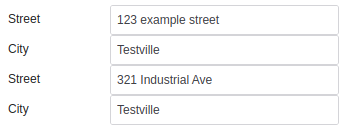
Content data:
{
  "address_one": {
    "street": "123 example street",
    "city": "Testville"
  },
  "address_two": {
    "street": "321 Industrial Ave",
    "city": "Testville"
  }
}
client/default/view.xet:
<overlay>
    <template id="address">
        <et2-textbox id="street" label="Street"></et2-textbox>
        <et2-textbox id="city" label="City"></et2-textbox>
        ...
    </template>
    <template id="client.view">
        ...
        <et2-template template="address" content="address_one"></et2-template>
        <et2-template template="address" content="address_two"></et2-template>
        ...
    </template>
</overlay>
Result:
Layout
A template can arrange its children for you instead of leaving that to a <grid>. Set
layout and the widgets inside become a responsive column grid or a stack, re-flowing as the
popup or panel changes size:
<et2-template id="myapp.edit" layout="edit">
    <et2-textbox id="name" label="Name"></et2-textbox>
    <et2-select id="status" label="Status"></et2-select>
    <et2-date id="due" label="Due"></et2-date>
</et2-template>
The widgets go directly inside the template - a wrapping grid or box would leave the layout with a single
child to arrange. layout has no default, so a template that does not set it lays out exactly as
it always has.
See Layout Controller for the available layouts
(stack, 2-column, edit), the span and
grow attributes, and the CSS variables that control when the columns collapse, or
Layout for the other ways to arrange widgets in a template.
Slots
| Name | Description |
|---|---|
| (default) | The template’s contents |
loader
|
Displayed while the template contents are being loaded instead of the built-in loader |
Learn more about using slots.
Properties
| Name | Description | Reflects | Type | Default |
|---|---|---|---|---|
autoLoad
|
Load the template automatically when it is connected or when template / id / url / content is set.
Turn it off if you only want the element as a handle for reading the template’s XML, not its widgets
- building a full widget tree just to throw it away is expensive, and any webComponent inside a
legacy
|
boolean
|
true
|
|
content
|
Used as index into content array for passing in specific content to the template other than what it would get by its ID |
string
|
- | |
layout
|
Opt in to a layout for this template’s children, eg. layout=“2-column”. Deliberately has no default. The property reflects, and the layout CSS keys off the attribute, so giving this a default would hand that layout to every template in every app. Without the attribute a template lays out exactly as it did before layouts existed. |
|
Et2LayoutName
|
- |
template
|
Name / ID of template. It can be full [app].[template_file].[template] form or just the last part. Templates will be loaded from /[app]/templates/interface/[template_file].xet To use the short form, the file must already be loaded. |
string
|
- | |
templateCache
|
Cache of known templates |
{[name : string] : Element}
|
{}
|
|
url
|
A full URL to load template, optionally including cache-buster (‘?’+filemtime of template on server) |
string
|
- |
Learn more about attributes and properties.
Inherited properties (21)
Et2Widget
| Name | Description |
|---|---|
accesskey |
Accesskey provides a hint for generating a keyboard shortcut for the current element. The attribute value must consist of a single printable character. |
actions |
Set Actions on the widget Each action is defined as an object: move: { type: “drop”, acceptedTypes: “mail”, icon: “move”, caption: “Move to” onExecute: javascript:mail_move” } This will turn the widget into a drop target for “mail” drag types. When “mail” drag types are dropped, the global function mail_move(egwAction action, egwActionObject sender) will be called. The ID of the dragged “mail” will be in sender.id, some information about the sender will be in sender.context. The etemplate2 widget involved can typically be found in action.parent.data.widget, so your handler can operate in the widget context easily. The location varies depending on your action though. It might be action.parent.parent.data.widget To customise how the actions are handled for a particular widget, override _link_actions(). It handles the more widget-specific parts. |
align |
Used by Et2Box to determine alignment. Allowed values are left, right |
class |
CSS Class. This class is applied to the outside, on the web component itself. Due to how WebComponents work, this might not change anything inside the component. |
data |
Set the dataset from a CSV |
deferredProperties |
Any attribute that refers to row content cannot be resolved immediately, but some like booleans cannot stay a string because it’s a boolean attribute. We store them for later, and parse when they’re fully in their row. If you are creating a widget that can go in a nextmatch row, and it has boolean attributes that can change for each row, add those attributes into deferredProperties |
disabled |
Defines whether this widget is visibly disabled. The widget is still visible, but clearly cannot be interacted with. Widgets disabled in the template will not return a value to the application code, even if re-enabled via javascript before submitting. To allow a disabled widget to be re-enabled and return a value, disable via javascript in the app’s et2_ready() instead of an attribute in the template file. |
dom_id |
Get the actual DOM ID, which has been prefixed to make sure it’s unique. |
full |
Take every column of a layout, the same as span="all". Boolean rather than a bare
marker so it can be driven from content the way the rest of the template can -
full="@is_wide" resolves through the array manager like any other boolean attribute.
That does mean it needs a value: write full="true", since an empty
full="" resolves to false and removes the attribute again. Reflects for the same
reason grow does.
|
grow |
How much of a layout’s leftover space this widget should take. Only means anything inside a
container that has a layout (see Et2LayoutController): a bare grow or
grow="1" takes an equal share of whatever the non-growing children left over,
grow="2" takes twice what a grow="1" sibling does. It has to reflect.
The layout stylesheet matches the [grow] attribute - CSS cannot see a property - and
transformAttributes() only calls setAttribute() for an attribute the element already carries or a
property declared as reflecting. Widgets built from a .xet are created with
document.createElement() and handed their attributes as an object, so they carry none at that
point: without this declaration grow="1" lands as an inert JS property and nothing in
the layout ever matches it.
|
hidden |
The widget is not visible. As far as the user is concerned, the widget does not exist. Widgets hidden with an attribute in the template may not be created in the DOM, and will not return a value. Widgets can be hidden after creation, and they may return a value if hidden this way. |
id |
Get the ID of the widget |
label |
The label of the widget This is usually displayed in some way. It’s also important for accessability. This is defined in the parent somewhere, and re-defining it causes labels to disappear |
noLang |
Disable any translations for the widget |
parentId |
Parent is different than what is specified in the template / hierarchy. Widget ID of another node to insert this node into instead of the normal location |
span |
How many of a layout’s columns this widget should take.
span="all" is every column wherever the widget landed, span="end" /
span="*" is from its own column to the end of its line. Only means anything inside a
container that has a layout, and only for the column layouts -
stack gives every child the full width anyway. The same name is also read straight
off the XML node by the legacy <grid> widget, for the unrelated job of counting
table cells to merge; that path never looks at the widget, so declaring it here does not disturb
it. Reflecting it does mean a legacy grid’s span="all" cells now carry the attribute
too, which matches nothing outside a layout. Reflects for the same reason grow does.
|
statustext |
Tooltip which is shown for this element on hover |
styles |
WebComponent * |
options |
Get property-values as object |
supportedWidgetClasses |
et2_widget compatability |
LitElement
| Name | Description |
|---|---|
updateComplete |
A read-only promise that resolves when the component has finished updating. |
Events
| Name | Description | Event Detail |
|---|---|---|
load |
Emitted when all elements are loaded |
CustomEvent
|
Learn more about events.
Methods
| Name | Description | Arguments |
|---|---|---|
getDOMWidgetById()
|
Searches for a DOM widget by id in the tree, descending into the child levels. |
_id:
|
getInputWidgetById()
|
Searches for a Value widget by id in the tree, descending into the child levels. |
_id:
|
getPreferredSize()
|
The size this template’s layout would like to be, so a window around it (a popup) can fit itself to it. |
columns: number
|
getValueById()
|
Get the current value of a child widget, specified by the given ID This is the current value of the widget, which may be different from the original value given in content |
id: string
|
load()
|
Get the template XML and create widgets from it Asks the server if we don’t have that template on the client yet, then takes the template node and goes through it, creating widgets. This is normally called automatically when the template is added to the DOM, but if you want to re-load or not put it in the DOM you need to call load() yourself. |
                      newContent: object, newSelectOptions: { [widgetID : string] : SelectOption[] }, newReadonlys: {
                      [widgetID : string] : string | boolean | object }, newModifications: { [widgetID : string] :
                      string | boolean | object }
|
setDisabledById()
|
Set the value for a child widget, specified by the given ID |
id: string, value: boolean
|
setValueById()
|
Set the value for a child widget, specified by the given ID |
id: string, value:
|
Learn more about methods.
Inherited methods (21)
Et2Widget
| Name | Description |
|---|---|
checkCreateNamespace() |
Override parent to support content attribute Templates always have ID set, but seldom do we want them to create a namespace based on their ID. |
clone() |
Creates a copy of this widget. |
createElementFromNode() |
Create a et2_widget from an XML node. First the type and attributes are read from the node. Then the readonly & modifications arrays are checked for changes specific to the loaded data. Then the appropriate constructor is called. After the constructor returns, the widget has a chance to further initialize itself from the XML node when the widget’s loadFromXML() method is called with the node. |
getArrayMgr() |
Returns the array manager object for the given part |
getArrayMgrs() |
Returns an associative array containing the top-most array managers. |
getChildren() |
Get child widgets Use |
getInstanceManager() |
Returns the instance manager |
getPath() |
Returns the path into the data array. By default, array manager takes care of this, but some extensions need to override this |
getRoot() |
Returns the base widget Usually this is the same as getInstanceManager().widgetContainer |
loadFromXML() |
Loads the widget tree from an XML node |
loadingFinished() |
Needed for legacy compatability. |
parseXMLAttrs() |
The parseXMLAttrs function takes an XML DOM attributes object and adds the given attributes to the _target associative array. This function also parses the legacyOptions. N.B. This is only used for legacy widgets. WebComponents use transformAttributes() and do their own handling of attributes. |
set_label() |
NOT the setter, since we cannot add to the DOM before connectedCallback() TODO: This is not best practice. Should just set property, DOM modification should be done in render https://lit-element.polymer-project.org/guide/templates#design-a-performant-template |
setArrayMgr() |
Sets the array manager for the given part |
setArrayMgrs() |
Sets all array manager objects - this function can be used to set the root array managers of the container object. |
setInstanceManager() |
Set the instance manager Normally this is not needed as it’s set on the top-level container, and we just return that reference |
_handleClick() |
Click handler calling custom handler set via onclick attribute to this.onclick |
destroy() |
et2_widget compatability |
set_class() |
Set the widget class |
set_disabled() |
Wrapper on this.disabled because legacy had it. |
set_statustext() |
supports legacy set_statustext |
Parts
| Name | Description |
|---|---|
template |
Wrapper around template content |
loader |
Displayed while the template contents are being loaded |
Learn more about customizing CSS parts.